

In diligence, you expect an owner to explain how the business is performing. What is growing? Where is work getting stuck? Which customers drive the economics? What needs management’s attention?
If the answers depend on calling several people and rebuilding spreadsheets, you have a management-visibility question to investigate. The financial statements describe results. Understanding the operating process helps you assess whether those results are repeatable.
We think TAS leaders should apply that same standard to their own practices.
That is the operating purpose of Practice Intelligence, part of the TAS Operating System by Audit Sight: connect the questions a practice leader asks to the engagements the team is running.
Partners can know their individual deals extremely well while the practice-wide picture remains difficult to assemble. Fees, requests, deadlines, review commitments, and status updates may live in separate places. Leadership can see that people are busy without having a dependable explanation of what is moving, what is waiting, and why.
As AI reduces preparation work, that distinction becomes more consequential. We need to understand whether deals are moving faster, quality is holding up, and the practice’s economics are improving.
Operating discipline shows up in the numbers
SPI Research’s 2026 Professional Services Maturity Benchmark covered 509 organizations. Its co-publisher reports 14.5% EBITDA margins for the high-performing group versus 6.7% for the remaining firms. The groups reflect a broad maturity framework spanning leadership, clients, talent, execution, and finance. [1]
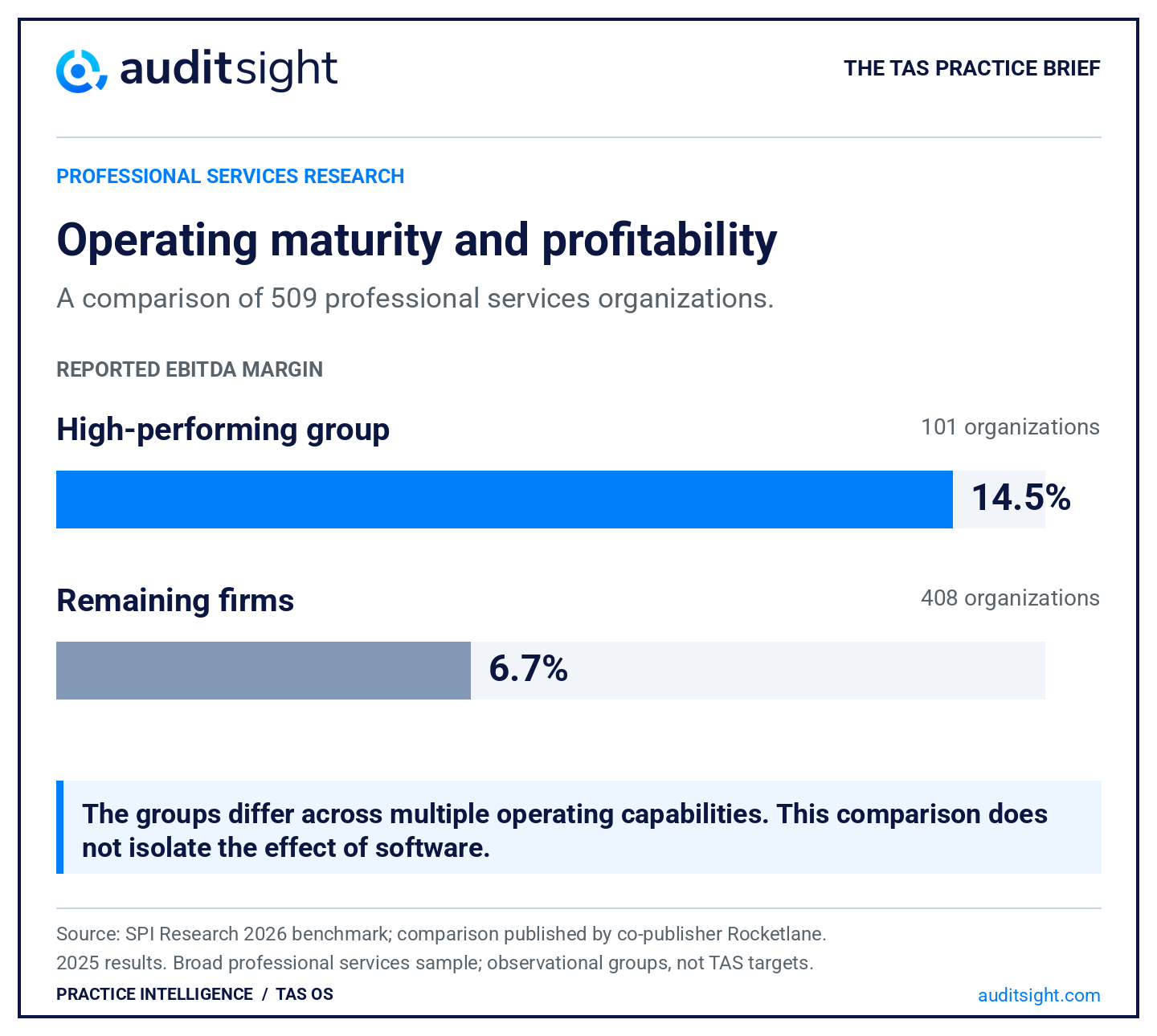
The useful conclusion is that delivery discipline and financial performance deserve to be examined together. These are observational, cross-industry results. They do not establish that a dashboard causes higher profits, or set a margin target for a TAS firm.
Our operating question is more specific: can leadership connect a change in practice performance to the work, clients, and delivery decisions behind it? That is the explanation we would expect to test in diligence.
AI changes what an hour tells you
A randomized experiment involving 758 BCG consultants illustrates why speed and quality need separate measures. On tasks suited to GPT-4, AI users completed work 25.1% more quickly, with improved quality. On a task outside its capabilities, correctness fell by an average of 19 percentage points. The published study describes different task conditions, not a uniform effect across consulting work. [2]
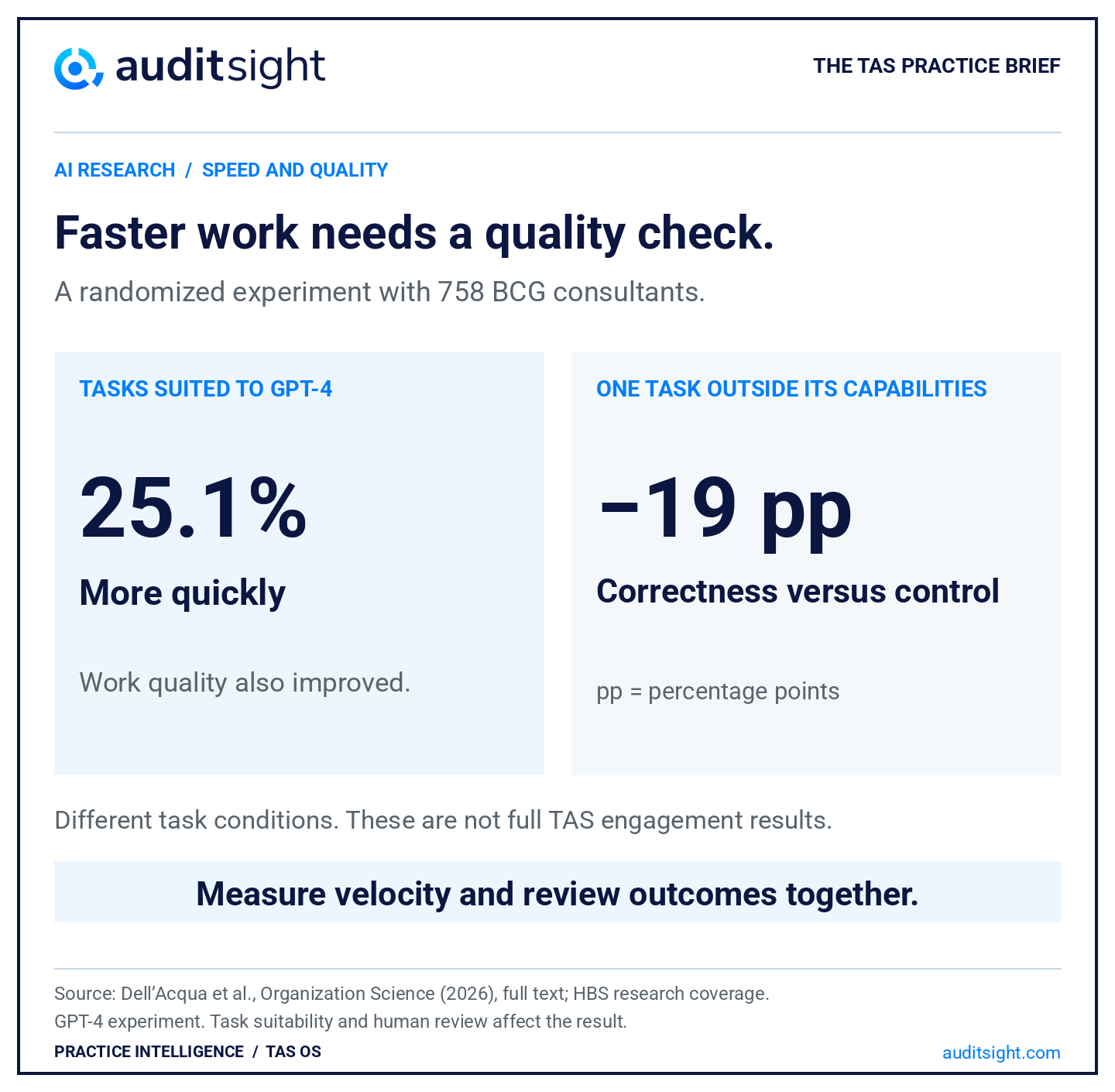
For a TAS practice, time saved on an individual task is an input to a larger operating question. Leadership still needs to see how the active book is progressing and where intervention is required.
Faster extraction or analysis does not resolve a missing document, an overdue request, or an unclear owner. Those are operating conditions the team can review in the Overview dashboard in Practice Intelligence.
Hours still matter for cost, staffing, and effort. Practice Intelligence adds another lens: what work is arriving, what expected fees it represents, and how the active engagements are progressing.
Five questions to bring into your next practice review
Practice Intelligence, part of the TAS Operating System by Audit Sight, connects these operating questions to two views of the practice. Trends shows how engagement intake and fee mix are changing. Overview shows the active book: document arrival, task progress, overdue work, and ownership.
Here is how we would use those views in a weekly leadership conversation.
1. Is growth coming from more engagements, a different mix, or larger fees?
Start in Trends with Engagements Added, Average Fee, and Total Estimated Fees. Read them together. Engagement count can rise while average fees fall; a higher volume of work does not necessarily bring a proportional increase in expected fees.
Then use Group by to examine the mix. For example, group monthly engagement intake by Client Type to see the mix of private equity, family offices, independent sponsors, corporate buyers, and lenders. Change the grouping to another detail your firm tracks, such as industry or source of opportunity, to investigate what is driving the change.
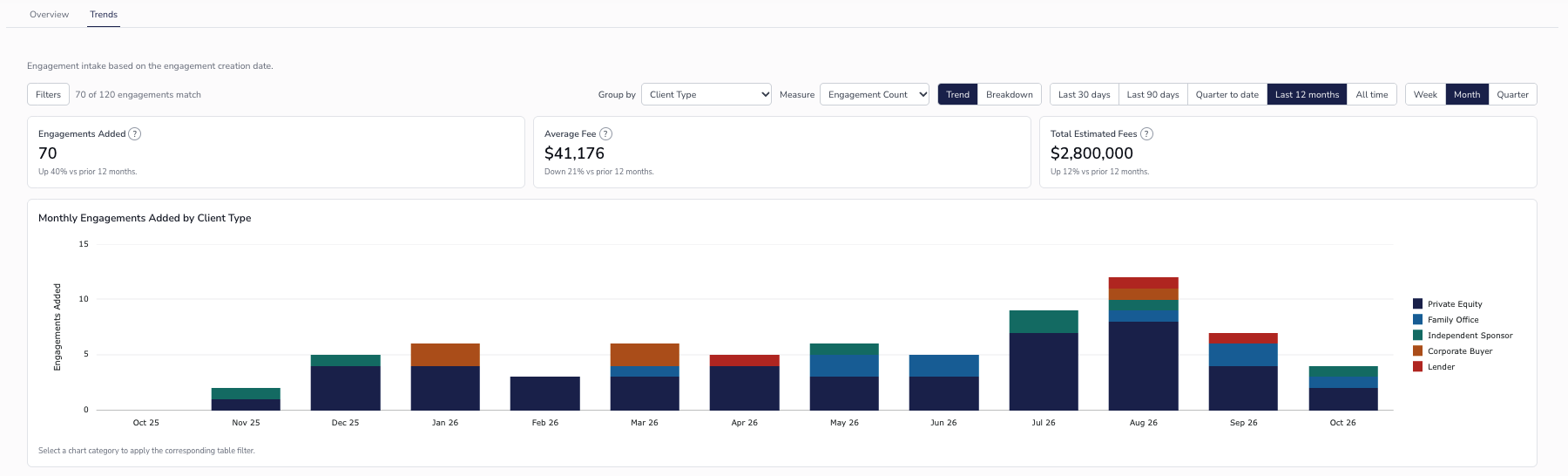
The management decision: Where should we focus business development, and does the work we are adding match the practice we want to build?
Trends measures engagements added to Audit Sight by creation date. It is an intake view, rather than a count of completed deals. Compare periods with consistent system coverage, and read fee measures as expected fees, rather than earned revenue or margin.
2. Has data started arriving on the work we have accepted?
Move to Overview and compare Active engagements, With data, and Without data. Where your firm tracks expected fees, those cards also show the estimated fees associated with each group.
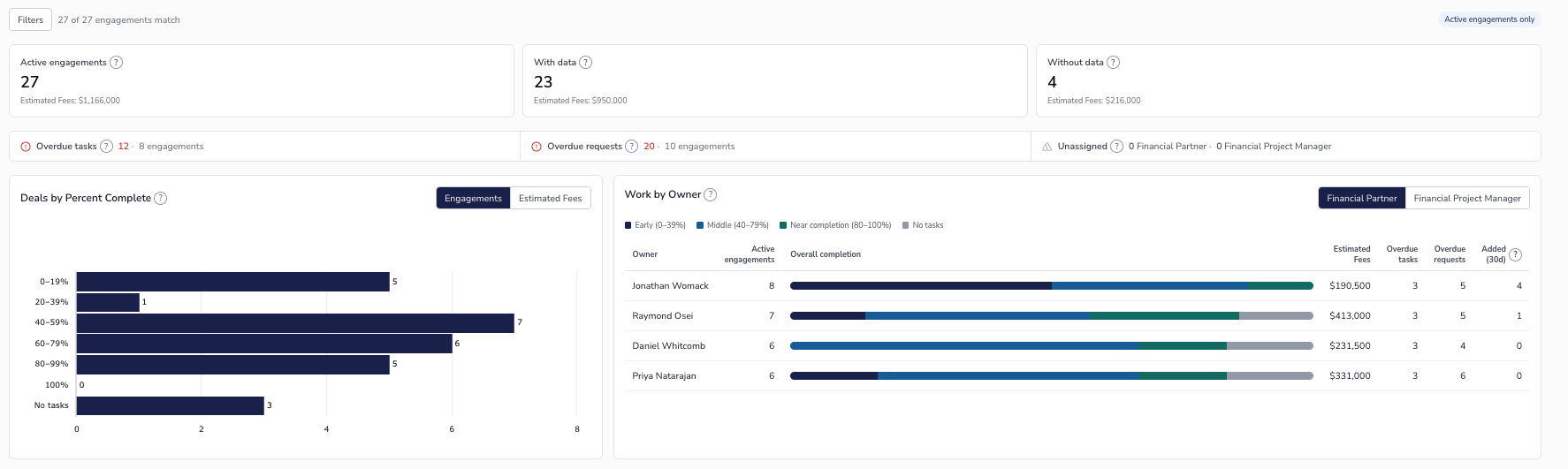
This makes the first follow-up concrete: which active engagements have no documents yet, who owns them, and what needs to happen next? The associated fee figure adds commercial context to that conversation.
The management decision: Which client follow-ups or onboarding actions should we prioritize so the team can move the work forward?
With data means at least one document has arrived on the engagement's Documents tab. It does not mean the request list is complete or that all information needed for analysis is ready.
3. How far along is the active book?
Deals by Percent Complete groups active engagements into completion ranges, with a separate No tasks category. View the distribution by Engagements or, where enabled, Estimated Fees.
The distribution gives leadership a more useful starting point than a single count of open deals. Is most of the book early in the workflow? Is a large group nearing completion? Are engagements sitting outside the task structure altogether?
The management decision: Which engagements need a closer look, and what work should partners and managers prepare to support next?
Percent complete reflects task progress. It does not establish that a report has been delivered or that a corresponding portion of the fee has been earned. Overview also keeps engagements visible until they are archived, so archiving finished work keeps the active picture useful.
4. What needs intervention this week?
The Overdue tasks and Overdue requests indicators show both the number of overdue items and the number of engagements affected. That separates a concentrated problem on one deal from an issue spread across the practice.
Use Filters to focus the view, then inspect the engagements in the table below. A dashboard flag starts the investigation: does the team need client information, an internal handoff, a review commitment, or a revised plan?
The management decision: Who will resolve the issue, what will they do, and by when?
Keep due dates current. An item without a due date will not appear as overdue, so a clean indicator is only as useful as the underlying commitments.
5. Where is work concentrated, and where is new work landing?
Work by Owner brings the operating picture back to accountability. Switch between Financial Partner and Financial Project Manager to see active engagements, their completion distribution, estimated fees, overdue tasks and requests, and Added (30d).
Two owners can each have eight engagements and face very different operating situations. One may have several deals nearing completion; another may have a book concentrated in early work, overdue requests, and recent additions. The dashboard makes that difference visible so leadership can ask better questions.
The management decision: Where do we need support, a clearer handoff, or a different allocation of incoming work?
Review Unassigned alongside the owner table so missing partner or project-manager assignments get addressed. Engagement counts and expected fees provide context; staffing decisions still need the complexity, timing, and resources behind each deal.
A weekly review should change a decision
Start with Trends: what changed in intake, average fees, and the mix of work? Then move to Overview: has data started arriving, how far along is the active book, what is overdue, and who owns the work?
Keep the conversation connected to the underlying engagements. In Trends, select a chart category to investigate that part of the practice. In Overview, use Filters to focus the cards, charts, and engagement table on the group you want to review.
End with an owner, a next action, and a date. The value of the review is the client follow-up, staffing conversation, deadline decision, or ownership correction that happens because the team can see the issue.
Practice Intelligence connects the dashboard to the work
We built Audit Sight to eliminate manual work. With TAS OS, the request list, documents, tasks, and workpapers sit within the engagement the team is running. Practice Intelligence brings that engagement context into a view leadership can use to manage the practice.
That connection matters as AI changes how preparation gets done. Leaders still need to understand the work coming in, whether documents are arriving, how tasks are progressing, what is overdue, and where responsibility sits. Those are the questions the Trends and Overview dashboards bring into the same conversation.
The expectation is familiar to anyone who has performed diligence: explain the change, support it with evidence, and show how management is responding. We think our own practices deserve the same standard.
See Practice Intelligence inside the TAS Operating System. We would also love to hear which operating questions are hardest to answer in your practice. Connect with either of us on LinkedIn.
— Jonathan & T.C.
Co-founders, Audit Sight
Sources and scope
- SPI Research’s 2026 Professional Services Maturity Benchmark, 2025 results; comparison and group counts published by co-publisher Rocketlane. These are broad professional services data, not TAS-only results or causal software effects.
- Dell’Acqua and co-authors, “Navigating the Jagged Technological Frontier,” Organization Science, published online March 11, 2026, including the task-condition findings and correctness comparison in the full text; see also HBS’s research coverage.
TAS applications and the proposed operating review are our interpretation.
Get the next brief.
Deal delivery, AI, and practice management. Free, every Saturday.
Get the Saturday brief

